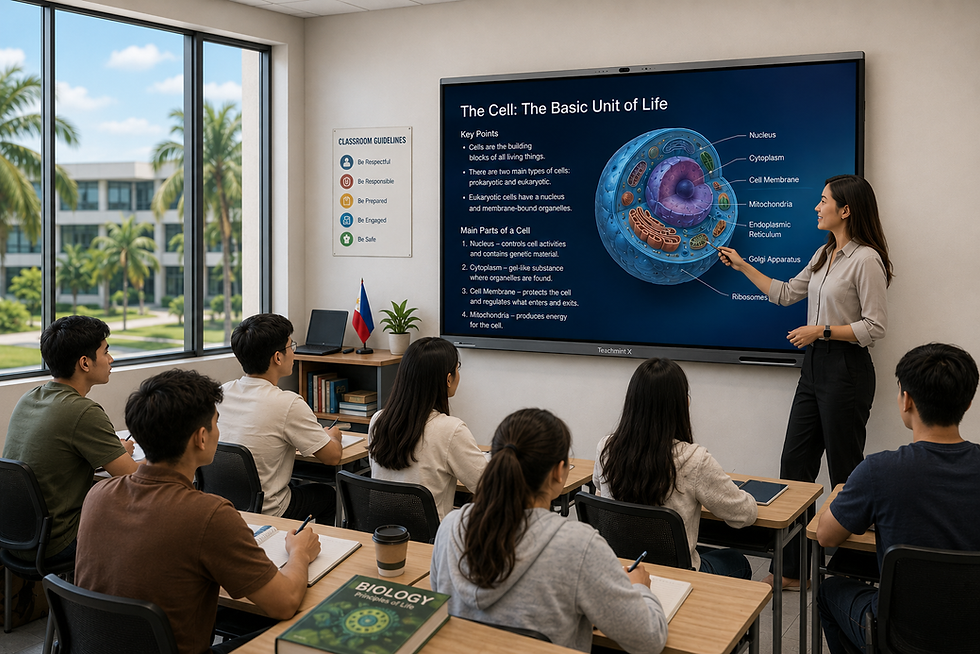
Interactive Flat Panel for Universities in the Philippines
Universities in the Philippines are evolving into more digitally connected learning environments. Faculty members increasingly use multimedia presentations, online academic resources, hybrid lectures, collaborative projects, simulations, research content, and digital tools as part of everyday instruction.
An interactive flat panel for universities in the Philippines can bring many of these teaching activities onto one large touchscreen display.
Instead of relying on a projector for presentations and a separate whiteboard for explanations, faculty members can present, write, annotate, access digital content, share screens, and collaborate directly from the interactive panel.
For universities planning classroom modernization, the right interactive flat panel should therefore be evaluated as part of the institution's broader teaching and learning infrastructure—not simply as another display.
How Interactive Flat Panels Support Modern University Teaching
University teaching often moves between different formats during a single session.
A faculty member may begin with a presentation, explain an idea using handwritten notes, open a research paper, display a video, annotate a diagram, invite students to present their work, and then connect with a guest lecturer online.
An interactive flat panel can make these transitions easier by providing one central teaching surface.
This can support a more flexible learning environment across undergraduate, postgraduate, professional, and research programs.
Interactive Lectures
Faculty members can write directly over presentations, highlight information, draw diagrams, work through calculations, and add explanations during a lecture.
This allows prepared content and spontaneous teaching to work together.
Collaborative Learning
Students can use the interactive display during:
Group presentations
Project discussions
Brainstorming
Case analysis
Research reviews
Design critiques
Problem-solving sessions
Instead of only displaying information, the panel can become a shared workspace.
Hybrid and Remote Teaching
Universities may need to connect students, visiting professors, industry experts, researchers, or other campuses remotely.
Interactive flat panels with integrated cameras, microphones, speakers, and compatible conferencing tools can help support these hybrid learning scenarios.
Digital Academic Resources
Faculty members can work with:
Research papers
Presentations
PDFs
Academic websites
Videos
Charts
Data visualizations
Digital textbooks
Cloud documents
Teaching applications
directly during classroom instruction.
Interactive Flat Panel Options for Universities in the Philippines
Universities in the Philippines can consider interactive display solutions such as Teachmint X, ViewSonic ViewBoard, LG CreateBoard, Horion, Qeoyo, and Hikvision.
The right choice depends on teaching requirements, IT infrastructure, classroom type, software ecosystem, and institutional deployment plans.
Teachmint X
Teachmint X is an AI-powered interactive flat panel built specifically for educational environments.
For universities, its value goes beyond providing a large touchscreen. It combines interactive teaching hardware with EduAI, digital whiteboarding, smart teaching tools, classroom monitoring, wireless collaboration, and integrated audio-video capabilities.
This can make it suitable for institutions looking to create connected and AI-enabled university classrooms.
Key Capabilities of Teachmint X
Teachmint X includes capabilities such as:
4K interactive display
Google EDLA-certified environment
EduAI teaching tools
AI-powered interactive whiteboard
Smart writing
Shape recognition
AI-assisted search
Wireless screen sharing
Octa-core processor
NPU for AI-powered tasks
48MP 4K AI-powered camera
8-array omnidirectional microphone
Built-in speakers
NFC functionality
Connected classroom capabilities
EduAI for University Teaching
Higher education involves complex concepts, technical material, large volumes of information, and varied teaching requirements.
EduAI can assist faculty members while working with educational content directly from the interactive environment.
Depending on the teaching workflow, educators can use AI to support activities such as:
Working through questions
Explaining concepts
Searching educational information
Preparing teaching material
Interacting with classroom content
Supporting mathematics and physics explanations
Using voice-based assistance
The value comes from having AI available within the teaching workflow rather than treating it as a completely separate application.
Interactive Whiteboarding for Higher Education
Digital whiteboarding can support different academic disciplines in different ways.
Engineering: Faculty members can develop system diagrams, calculations, technical explanations, and design concepts.
Mathematics: Lecturers can work through equations and demonstrate solutions step by step.
Science: Diagrams, experimental information, graphs, images, and calculations can be annotated directly.
Business and Management: Faculty can work with frameworks, case studies, financial information, presentations, and collaborative activities.
Architecture and Design: Students and faculty can review visual material, annotate designs, and conduct collaborative critiques.
Humanities: Teachers can annotate texts, timelines, historical material, and visual resources during discussions.
This flexibility is important because universities rarely use classroom technology for only one type of teaching.
VisionX for Connected University Classrooms
A university may operate dozens or hundreds of teaching spaces.
Once interactive displays are deployed across multiple classrooms, managing the broader environment becomes increasingly important.
Teachmint's VisionX Classroom Monitoring System can support:
Real-time classroom visibility
Screen monitoring
Audio access
Broadcast communication
Alerts
Classroom-level monitoring
This can be useful for institutions looking for centralized visibility across technology-enabled learning spaces.
Integrated AV for Hybrid Learning
Teachmint X includes built-in audio-video hardware such as an integrated camera, microphone array, and speakers.
This can support:
Hybrid lectures
Online faculty sessions
Visiting professor lectures
Faculty development programs
Inter-campus meetings
Remote academic collaboration
Training sessions
An integrated setup can also reduce dependence on separate cameras, microphones, and speaker systems in each classroom.
Teachmint X for Higher Education in the Philippines
Teachmint has a dedicated presence in the Philippines.
Teachmint X can be considered by:
Universities
Colleges
Higher education institutions
Professional institutes
Multi-campus institutions
Research-oriented institutions
Universities planning AI-enabled classrooms
Institutions modernizing teaching infrastructure
For universities looking beyond a standalone display, Teachmint X provides an education-focused combination of interactive teaching, AI, digital whiteboarding, and connected classroom capabilities.
ViewSonic ViewBoard
ViewSonic ViewBoard is an established interactive display platform available for education in the Philippines.
Its ecosystem includes interactive whiteboarding, wireless sharing, collaboration, and device-management capabilities.
Universities can consider ViewBoard for lecture rooms, seminar spaces, collaborative classrooms, and other higher education environments.
LG CreateBoard
LG CreateBoard provides interactive display and digital whiteboarding capabilities for education and collaboration.
It can support presentations, annotation, group discussions, and interactive content, making it relevant for classrooms, seminar rooms, and collaborative university spaces.
Horion Interactive Flat Panel
Horion offers interactive display solutions in the Philippines for education and professional collaboration.
Its supported models provide capabilities such as touchscreen interaction, digital whiteboarding, screen mirroring, and smart presentation tools.
Qeoyo Interactive Flat Panel
Qeoyo offers interactive smart boards in the Philippine market.
Its interactive displays can support 4K content, whiteboarding, wireless sharing, and integrated AV features on selected models.
Universities can evaluate different sizes depending on classroom and seminar-room requirements.
Hikvision Interactive Flat Panel
Hikvision provides interactive display and professional AV solutions that can support higher education environments.
Universities considering Hikvision should evaluate the specific panel, software environment, AV integration, and local support available for their deployment.
Where Can Universities Use Interactive Flat Panels?
Interactive displays are not limited to standard lecture rooms.
They can be deployed across several types of university learning and collaboration spaces.
Lecture Rooms
Faculty members can combine presentations, handwritten explanations, videos, diagrams, and online academic resources.
Seminar Rooms
Smaller classes can use the panel as a collaborative workspace for discussion, presentations, and group activities.
Engineering Classrooms
Interactive displays can support technical diagrams, calculations, simulations, design discussions, and visual problem solving.
Science Laboratories and Teaching Rooms
Faculty members can display experimental information, diagrams, videos, scientific images, and data while adding live annotations.
Business Schools
Professors can work with case studies, frameworks, financial models, charts, strategy discussions, and student presentations.
Architecture and Design Studios
Interactive displays can support visual reviews, design presentations, annotation, brainstorming, and collaborative feedback.
Research and Collaboration Spaces
Faculty members and researchers can use interactive boards for:
Data review
Research discussions
Planning
Visual analysis
Collaborative projects
Academic presentations
Faculty Training Rooms
Universities can also use interactive panels for professional development, workshops, technology training, and internal academic meetings.
What Should Universities Evaluate Before Buying an Interactive Flat Panel?
Interactive display procurement for higher education should involve academic, IT, and infrastructure considerations.
Room Type and Display Size
A small seminar room and a large lecture classroom should not necessarily use the same panel size.
Universities should consider:
Room dimensions
Student capacity
Viewing distance
Teaching style
Display placement
Type of academic content
65-inch panels may work well in smaller spaces, while 75-inch or 86-inch displays may be better suited to larger classrooms.
Writing Performance
Faculty members should be able to move naturally between prepared content and handwritten explanations.
Universities should test:
Writing latency
Touch accuracy
Stylus response
Palm rejection
Erasing
Annotation
Multi-touch
Shape recognition
A live demonstration is particularly important for mathematics, engineering, science, and other writing-intensive disciplines.
Content and Application Access
Faculty members use many different digital resources.
The interactive panel should make it easy to access or present:
PowerPoint presentations
PDFs
Videos
Websites
Cloud documents
Research material
Academic applications
Laptop content
The system should not create unnecessary steps between the lecturer and the content.
Why Operating System and App Compatibility Matter
Universities often already have established digital ecosystems.
Faculty members may use Google Workspace, Microsoft services, learning management systems, conferencing platforms, and discipline-specific applications.
The selected interactive panel should therefore integrate well with existing university technology.
Google EDLA certification, application compatibility, connectivity, and access to commonly used services can become important selection criteria.
AI in University Classrooms
AI is becoming increasingly relevant in higher education, but universities should evaluate practical academic use rather than marketing terminology.
Useful AI-supported classroom scenarios can include:
Explaining difficult concepts
Working through technical questions
Searching academic information
Supporting lecture preparation
Generating teaching material
Working with handwritten content
Supporting visual explanations
Voice-assisted interaction
AI should support faculty expertise rather than replace it.
Academic staff should remain responsible for reviewing AI-generated content and determining whether it is accurate and appropriate for students.
Connectivity for Faculty and Students
University classrooms often have multiple presenters.
A faculty member may use a university laptop, while students may present from their own devices.
Guest lecturers may bring different equipment entirely.
Interactive displays should therefore support flexible connectivity such as:
HDMI
USB
USB-C
Wi-Fi
Bluetooth
Wireless casting
Laptop connectivity
Tablet connectivity
Smartphone sharing
Simple connectivity can reduce delays during presentations and collaborative sessions.
Planning an Interactive Flat Panel Rollout Across a University
A university-wide deployment requires more planning than installing panels in a few rooms.
Institutions should consider:
Number of classrooms
Campus network capacity
Wi-Fi coverage
Mounting and installation
User access
Account management
Security
Software updates
Classroom monitoring
Technical support
Faculty training
Maintenance
Replacement planning
A phased deployment can be useful.
Universities can begin with selected departments or high-use teaching rooms, collect feedback from faculty and students, and then refine the rollout before expanding.
Faculty Training Is Essential
University faculty members have different levels of comfort with classroom technology.
Some may immediately explore interactive whiteboarding and AI tools, while others may initially use the panel only for presentations.
Training should therefore focus on practical academic workflows.
Faculty should learn how to:
Open and annotate teaching material
Use digital whiteboarding
Connect personal devices
Share content
Save classroom notes
Use interactive teaching tools
Access AI features
Conduct hybrid sessions
Work with multimedia
Technology adoption improves when faculty members understand how the panel can support the way they already teach.
Local Support in the Philippines
Universities should also evaluate what happens after installation.
For a large deployment, reliable technical support can be just as important as product specifications.
Institutions should ask:
Is installation available locally?
Is technical support available in the Philippines?
What warranty is provided?
How are hardware repairs handled?
Are replacement components available?
Are software updates supported?
Is faculty onboarding included?
Is onsite assistance available when required?
Local support is particularly important for multi-building and multi-campus deployments.
Interactive Flat Panel vs Projector in University Classrooms
Projectors continue to be valuable, particularly in auditoriums and very large lecture halls.
However, interactive flat panels can provide additional functionality for teaching spaces where direct engagement with content is important.
A lecturer can write directly on the display, annotate slides, manipulate digital content, open applications, and save classroom work.
With a projector, additional equipment may be required to achieve similar interactive functionality.
Universities may therefore use both technologies depending on the learning environment.
Moving Toward Connected University Classrooms
The long-term opportunity for universities goes beyond installing individual interactive displays.
Institutions can use classroom technology as part of a broader connected teaching environment.
This can include:
Interactive displays
AI-assisted teaching
Hybrid learning
Classroom monitoring
Wireless collaboration
Digital academic resources
Centralized management
Faculty training
Thinking at this ecosystem level can help universities avoid deploying isolated hardware that becomes difficult to manage or underused.
Why Universities in the Philippines Can Consider Teachmint X
Teachmint X approaches the interactive flat panel as part of an education ecosystem rather than simply a display.
It combines:
Interactive flat panel hardware
EduAI-powered teaching
Google EDLA-certified environment
Digital whiteboarding
Smart classroom tools
VisionX classroom monitoring
Integrated camera and microphones
Wireless collaboration
Connected classroom capabilities
This approach can be relevant for universities that want to connect classroom technology with faculty workflows and institutional management.
For higher education institutions planning multiple technology-enabled learning spaces, the ability to combine teaching, collaboration, AI, and classroom visibility can become an important consideration.
Making the Final Decision
The right interactive flat panel for universities in the Philippines should support both academic requirements and institutional infrastructure.
Before choosing a solution, universities should involve faculty members, IT teams, academic administrators, and facilities teams in the evaluation process.
Shortlisted panels should be tested using real university teaching scenarios.
Faculty members should try:
Presenting lecture material
Writing equations
Annotating research content
Sharing screens
Working with multimedia
Connecting different devices
Using AI-assisted tools
Conducting hybrid sessions
The best interactive flat panel is not necessarily the one with the largest number of specifications.
It is the platform that faculty can use naturally, IT teams can manage effectively, and the university can support over the long term.
Conclusion
An interactive flat panel for universities in Philippines can help institutions build more collaborative, flexible, and technology-enabled learning spaces.
The technology can support lectures, digital whiteboarding, academic discussions, hybrid learning, research collaboration, faculty training, and student presentations.
ViewSonic ViewBoard, LG CreateBoard, Horion, Qeoyo, and Hikvision are among the interactive display options universities can evaluate in the Philippine market.
For institutions looking for an education-focused solution that combines interactive teaching, EduAI, digital whiteboarding, integrated AV, and connected classroom monitoring, Teachmint X provides a comprehensive platform to consider for higher education digital transformation.